
API keys
Create, rotate, re-role and delete the API keys of your organisation and of your carriers in Orbit MissionControl, and see each key's history.
Orbit MissionControl
View as MarkdownCreate, rotate, re-role and delete the API keys of your organisation and of your carriers in Orbit MissionControl, and see each key's history.
Was this article helpful?
Did not find your answer?
Ask Luna, or write to our support team.
An API key lets another system work with Orbit without a person signing in: your TMS or ERP through the Operator API, or a carrier's telematics through the Carrier API. You manage every key of your organisation and of your carriers in Orbit MissionControl under Settings > API-Keys.
Key highlights:
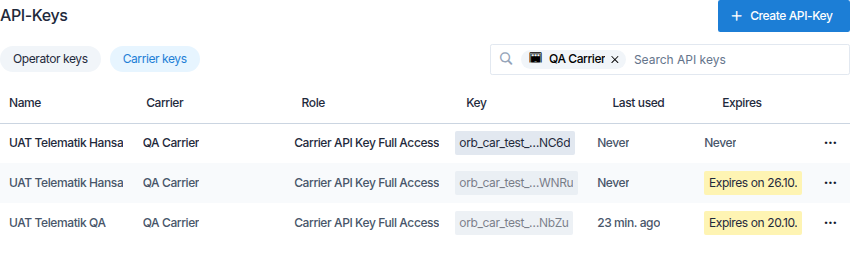
orb_car_live_…7Fq2.The page opens with Operator keys. Select Carrier keys to see the keys of your carriers, with a Carrier column. The search box at the right finds keys by name; in Carrier keys it also offers carriers, so you can narrow the list to one or more of them.
Each row shows the key's name, its role, the end of the key, when it was last used and when it expires. A row can carry these markers:
| Marker | Meaning |
|---|---|
| Rotation recommended | A key from before Orbit stored keys as fingerprints. It keeps working; rotate it when you can. |
| In 5 days | The key expires in fewer than seven days. |
| Expires on 20.10. | The old key of a rotation, working until that date. |
| Expired | The key no longer works. The row is greyed out. |
| Deactivated | The carrier is deactivated. The Carrier API refuses its keys until it is active again. |
Last used is updated at most every 15 minutes, so a key in constant use can show a time a few minutes ago.
Open Settings > API-Keys and select Operator keys or Carrier keys, depending on the key you need.
Select Create API-Key. A card opens above the list.
Enter a Name that tells you where the key is used, for example Telematics Northern Light. For a carrier key, choose the Carrier.
Choose the Role and when the key Expires: Never, In 30 days, In 90 days or In 365 days.
Select Create. A dialog shows the key. Copy it with Copy and store it where the other system can read it, then select I have saved the key.
Warning
The dialog is the only place the key is shown. If you close it without saving the key, delete the key and create a new one.
The role decides what a key may do. Role offers the roles a key of that kind can hold:
To change a key's role, open the row's … menu and select Change role …. The new role applies within a minute.
Rotating replaces a key with a new one that has the same name and role. Use it when a key may have been seen by someone else, or regularly as a precaution.
Open the row's … menu and select Rotate ….
Choose when the old key expires: At once, After 24 hours or After 7 days (recommended).
Select Rotate. The new key is shown once, as after a create. Enter it in the other system before the old one expires.
The list then shows the new key and, below it, the old one with its expiry date. A key can be rotated once; to replace it again, rotate the new key. An expired key cannot be rotated.
Open the row's … menu, select Delete … and confirm with Delete. Systems using the key lose access within a minute. A deleted key cannot be restored.
Select History in a row's … menu to see what happened to a key: when it was created, rotated, re-roled or deleted, and by whom. The history of a rotated key also lists the keys it replaced, back to the first one.
Spaceport Shipping Co. connects its warehouse system in Lyon with an operator key that never expires. Its carrier Northern Light Transport gets a carrier key with Carrier API Key Read Only, so its telematics in Hamburg can read its tours. When Julia, who set up the telematics, leaves the company, Max rotates the carrier key with an overlap of 24 hours and sends the new key to the carrier.
Operator keys work with the Orbit API; see the Orbit API Reference. Send the key in the x-api-key header.
No. Orbit stores only a fingerprint of each key, so nobody can show it again. Rotate the key or create a new one.
Nothing. A key belongs to your organisation or to the carrier, not to a person, and keeps working.
Orbit remembers a key for up to a minute. After that every request uses the new state.
The Carrier API refuses them while the carrier is deactivated. The list marks them with Deactivated.